05/06/2020
1588798680001
Take part in our International Tour Operator Roundtable this Friday, May 8th at 11am PST. From life in the heart of Italy to virtual tours of Wuhan, China - we will find out the situation for operators across the globe and delve into our industry’s current challenges.
Check out how we’ve been improving Peek Pro:
PRODUCT UPDATES
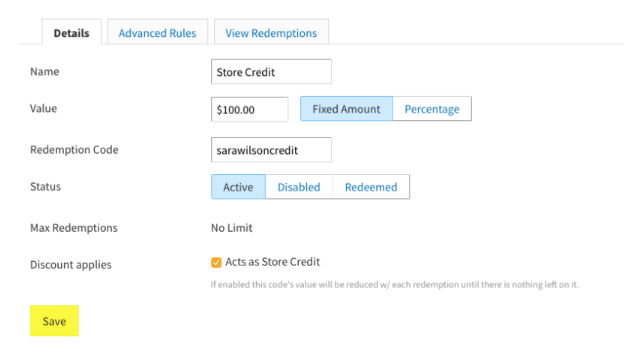
Store credit:
Store Credit is an awesome alternative to cancelling and refunding a booking!
How will this help lessen the load with refunds?
With the spread of COVID-19 you might be facing more refunds than usual. Our Store Credit feature allows your customer to redeem the full amount they spent at a later date - just like a cash gift card! You’ll give your customer a code, which will keep a record of the balance.
How can I get Store Credit up and running today?
Follow this step-by-step guide to get it set up.
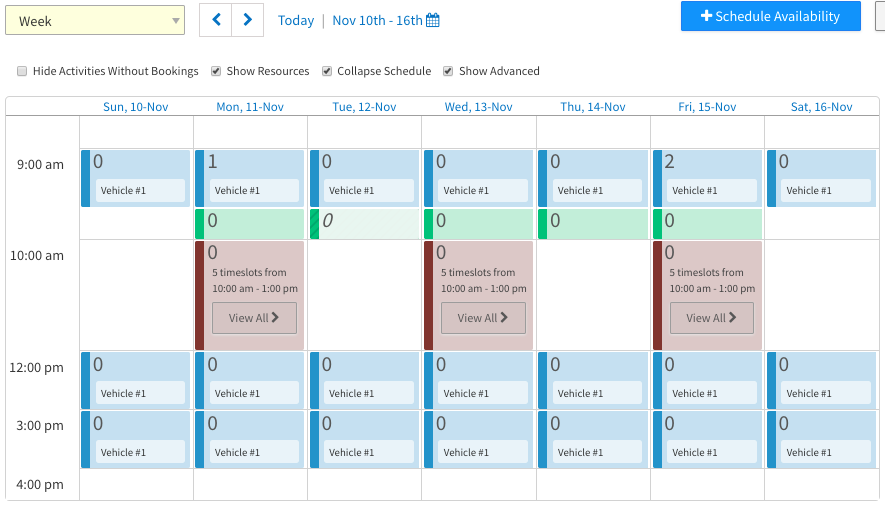
Collapsable calendar options on activity calendar:
You can now adjust the time block size on your Activity Schedule calendar, to suit your preference. This will allow you to condense the calendar and bring your booking data above the fold - so you have easier access to the information you need.
How does this work?
In the Activity Schedule section, when the “collapse schedule” box is unchecked, the time slot calendar sizes can be customized ranging from a 1 (smallest) to a 10 (largest) with 7 being the default.
Peek Pro 6 Deposits:
We have released a deposits feature on Peek Pro 6. This will allow you to collect a payment in advance of an activity or rental, without charging for the entire product.
When you move to PP6 you can choose to opt-in to using deposits or, if you’re already using PP6, you can submit a request to opt-in. Just reach out to our Partner Support team - [email protected].
Once enabled, the option to specify a deposit amount will show up alongside each ticket type in the Prices section of your Peek Pro Account. Then you will be able to take deposit bookings automatically on widget, for the tickets that have a deposit amount added.

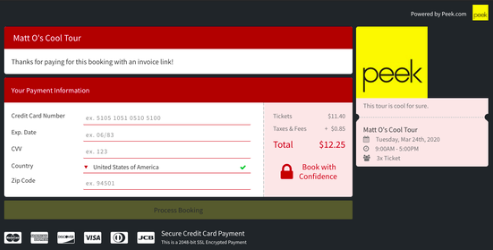
Peek Pro 6 Invoice links:
You can now send out invoices directly to customers, in Peek Pro 6. The secure link can be sent to any customer who has a pay later booking.
This is particularly helpful for private tours, large groups, corporate gatherings or any customer who is not comfortable giving credit card information over the phone. It’s an easy, user-friendly way of letting the customer pay at their convenience.
BUG FIXES
We fixed a bug with the Smart Cutoffs Feature - not all time slots were appearing as options.
There was an issue in Peek Pro 6, where cancelling a booking would also wipe out anything in the Notes section, this is now fixed.
We reconfigured the formatting of the Customer Profile, to ensure the tooltip doesn’t get cut-off for products with long names.
Thanks,
The Team at Peek
