06/17/2020
1592417880001
Here are some of the latest improvements we’ve made to Peek Pro:
PRODUCT UPDATES
Want to send specific information to customers attending a certain tour?
The {{notes}} variable in our Email Templates will now pull from Timeslot Notes on an Activity Timeslot so you can customize automated emails for individual time slots.
Do you take photos for your customers during a tour?
You can include a link to the photos in the automated follow-up emails to the customers who attended that particular activity. Put the link to the photos in the Timeslot Notes, then use the {{notes}} variable when composing the automated follow-up email.
Running virtual tours?
You can include a specific video chat or zoom link for customers attending a particular session. Drop the links in the corresponding Timeslot Notes to distribute the links to the correct customers. No need to compose a separate email template for each timeslot!
How have we streamlined the booking flow this month?
Option to skip the Time-Selector step if redundant
Do you offer one time slot per day for some of your activities? This update has streamlined the purchasing experience for customers, by removing the Time-Selector step if only one time slot is available. This new configuration will automatically select the first available time for an activity and take the customer right to the ticket screen once they select a date.
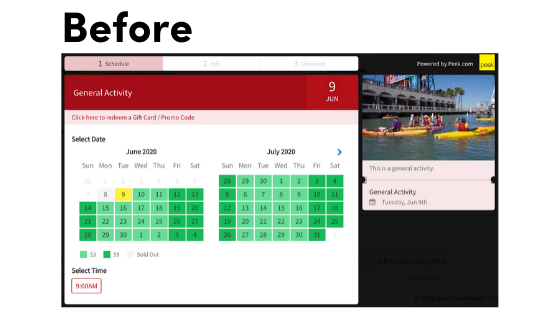
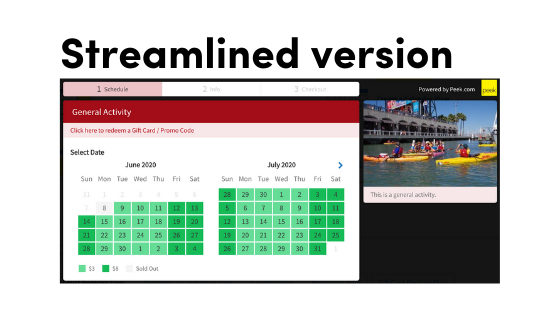
Automatically pre-populate parts of the booking process using customer’s location
Usually customers have to manually input their phone number, country code, and country when they make a booking. This new feature will use their IP address to pre-populate this information for their review, eliminating two steps from the booking process.
“Add to Cart” button removed for Bundle Add-ons
We simplified the process of selling add-ons within a Bundle widget flow by taking out the “Add to Cart” step. Customers will simply indicate how many Add-ons they would like using a +/- and the Add-ons will be added straight to the cart.
Rentals:
Rental Product page refresh
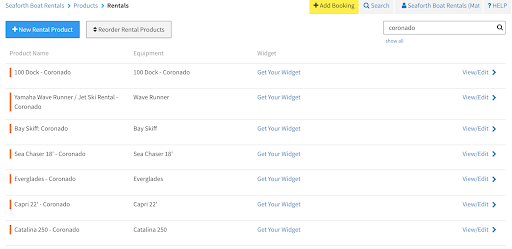
We made some improvements to the Rental Product page within Peek Pro that will make it load more quickly, improving your experience. You can now search across all rentals for a specific product and make edits to it. This is great if you have lots of rentals and want to quickly jump in and make a change.
Rentals End Date and Time email variables
We have added two new email variables so you can include the end date and end time for a customer’s rental booking in your automated emails. These variables are {{booked_until_date}} and {{booked_until_time}} and are available in email templates now!
Kiosk Mode Improvements:
User Interface renovation
We have overhauled the customer experience on Kiosk Mode to create a more seamless check-in process for your customers. Now, when customers check in, they will see all relevant booking information and associated waivers they need to sign.
Kiosk Mode now supports Group Waivers
If you have a customer that made a booking for a group of people, you can have each individual sign their own waiver without having to create separate bookings for them. This works great for rental products!
BUG FIXES
There was a bug for partners using the Pay Later feature with rentals in Peek Checkout, this has now been fixed.
